
Service Provider Guide
Guide for service providers to accept payments from Kite Agent Passport agents via x402 or MPP.
Kite Agent Passport can pay any service that implements one of two open payment protocols:
- x402 — HTTP 402-based payment protocol with on-chain settlement
- MPP (Machine Payments Protocol) — an open standard by Stripe and Tempo for machine-to-machine payments (mpp.dev)
If your service already speaks either protocol, Passport agents can pay you today. If you are starting fresh, this guide walks through both options.
We encourage deploying on Kite chain for the fastest settlement and tightest integration with Passport.
How Passport Pays Your Service
- An agent calls your service endpoint.
- Your service returns 402 Payment Required with payment terms.
- The Passport agent resolves payment using the user's approved spending session.
- Your service receives proof of payment, verifies it, and delivers the response.
The specifics of step 2–4 depend on which protocol you implement.
Option 1: Accept Payments via x402
x402 uses HTTP 402 responses to negotiate on-chain payments between agents and services.
Payment Flow
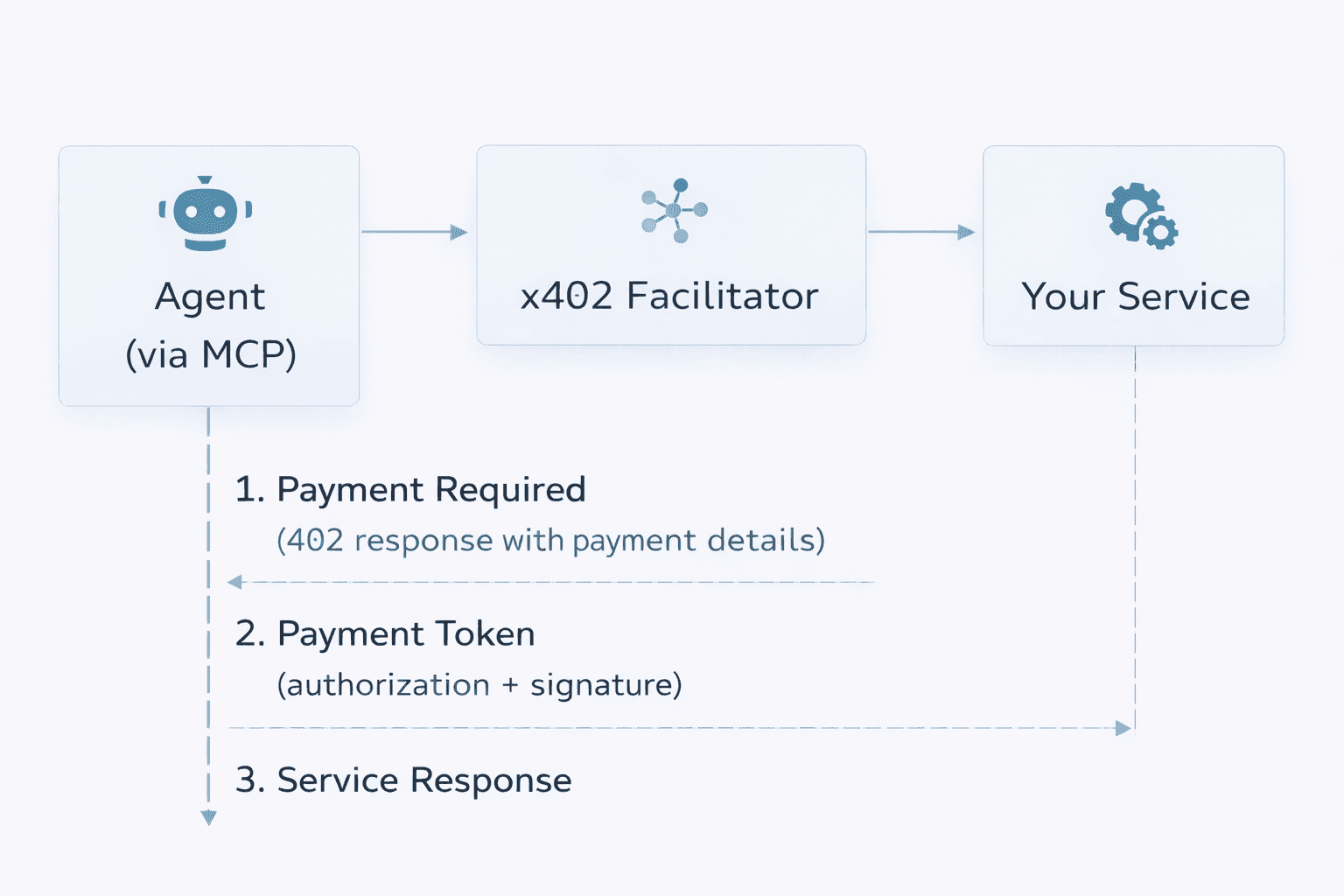
- Your service returns a 402 Payment Required response with payment details.
- The Passport agent obtains a signed payment authorization from the user's session.
- The agent resends the request with the
X-Paymentheader. - You verify the payment token and call a facilitator to settle on-chain.
- The facilitator executes the transfer to your wallet.
- You deliver the service response.
Sample Service: Weather API (Testnet)
Weather Service (Testnet): https://x402.dev.gokite.ai/api/weather
Call it without payment:
curl https://x402.dev.gokite.ai/api/weather?location=San%20FranciscoResponse (402 Payment Required):
{
  "error": "X-PAYMENT header is required",
  "accepts": [{
    "scheme": "gokite-aa",
    "network": "kite-testnet",
    "maxAmountRequired": "1000000000000000000",
    "resource": "https://localhost:8099/api/weather",
    "description": "Weather API - Public endpoint with query params",
    "mimeType": "application/json",
    "outputSchema": {
      "input": {
        "discoverable": true,
        "method": "GET",
        "queryParams": {
          "location": {"description": "City name or coordinates", "required": true, "type": "string"},
          "units": {"default": "metric", "enum": ["metric", "imperial"], "type": "string"}
        },
        "type": "http"
      },
      "output": {
        "properties": {
          "conditions": {"description": "Weather conditions", "type": "string"},
          "humidity": {"description": "Humidity percentage", "type": "number"},
          "temperature": {"description": "Current temperature", "type": "number"}
        },
        "required": ["temperature", "conditions"],
        "type": "object"
      }
    },
    "payTo": "0x4A50DCA63d541372ad36E5A36F1D542d51164F19",
    "maxTimeoutSeconds": 300,
    "asset": "0x0fF5393387ad2f9f691FD6Fd28e07E3969e27e63",
    "extra": null,
    "merchantName": "Weather Service"
  }],
  "x402Version": 1
}
Key Response Fields:
| Field | Description | Example |
|---|---|---|
scheme | Payment scheme | gokite-aa |
network | Target network | kite-testnet |
maxAmountRequired | Maximum payment amount (in wei) | 1000000000000000000 (1 token) |
asset | Token contract address | 0x0fF5393387ad2f9f691FD6Fd28e07E3969e27e63 |
payTo | Your service wallet address | 0x4A50DCA63d541372ad36E5A36F1D542d51164F19 |
maxTimeoutSeconds | Payment timeout | 300 |
merchantName | Your service name | Weather Service |
outputSchema | API input/output specification | (see above) |
Kite Testnet Payment Token
For testnet services on Kite, use this token:
Token Address: 0x0fF5393387ad2f9f691FD6Fd28e07E3969e27e63
Token Details: https://testnet.kitescan.ai/token/0x0fF5393387ad2f9f691FD6Fd28e07E3969e27e63
Kite Facilitator
Kite works with any x402-compatible facilitator. The recommended facilitator for Kite chain:
| Property | Value |
|---|---|
| Service | Pieverse Facilitator |
| Version | 2.0.0 |
| Base URL | https://facilitator.pieverse.io |
| Documentation | https://facilitator.pieverse.io/ |
Kite Testnet Facilitator Address:
0x12343e649e6b2b2b77649DFAb88f103c02F3C78bAPI Endpoints:
| Endpoint | Method | Description |
|---|---|---|
/v2/verify | POST | Verify payment signature |
/v2/settle | POST | Settle payment (execute on-chain) |
The facilitator handles on-chain execution. Once payment is authorized, it calls transferWithAuthorization and transfers funds directly to your payee address.
Implementing x402 in Your Service
Step 1: Return 402 Payment Required
When a request arrives without valid payment, return a 402 with your payment terms:
{
  "error": "X-PAYMENT header is required",
  "accepts": [{
    "scheme": "gokite-aa",
    "network": "kite-testnet",
    "maxAmountRequired": "1000000000000000000",
    "resource": "https://your-service.com/api/endpoint",
    "description": "Your API - Description of your service",
    "mimeType": "application/json",
    "outputSchema": {
      "input": {
        "discoverable": true,
        "method": "GET",
        "queryParams": {
          "param1": {"description": "Parameter description", "required": true, "type": "string"}
        },
        "type": "http"
      },
      "output": {
        "properties": {
          "result": {"description": "Result description", "type": "string"}
        },
        "required": ["result"],
        "type": "object"
      }
    },
    "payTo": "0xYourServiceWalletAddress",
    "maxTimeoutSeconds": 300,
    "asset": "0x0fF5393387ad2f9f691FD6Fd28e07E3969e27e63",
    "extra": null,
    "merchantName": "Your Service Name"
  }],
  "x402Version": 1
}
Step 2: Receive and Verify the Payment Token
The agent resends the request with an X-Payment header containing a base64-encoded authorization:
curl -H "X-PAYMENT: eyJhdXRob3JpemF0aW9uIjp7..." \
  https://your-service.com/api/endpoint
Step 3: Settle via Facilitator
curl -X POST https://facilitator.pieverse.io/v2/settle \
  -H "Content-Type: application/json" \
  -d '{
    "authorization": {...},
    "signature": "0x...",
    "network": "kite-testnet"
  }'
Step 4: After confirming settlement, deliver your service response.
x402 Resources
- x402 Protocol Specification: https://docs.x402.org/introduction
- Pieverse Facilitator Docs: https://facilitator.pieverse.io/
- Kite x402 Reference Implementation: https://github.com/gokite-ai/x402
Option 2: Accept Payments via MPP
MPP (Machine Payments Protocol) is an open standard co-authored by Stripe and Tempo. It extends the HTTP 402 pattern with support for multiple payment methods, session-based billing, and IETF standardization.
Payment Flow
- Agent requests a resource from your service.
- Your service responds with a 402 challenge containing payment terms.
- The agent submits a credential (proof of payment).
- Your service verifies the credential, returns a receipt, and delivers the resource.
Key Differences from x402
| x402 | MPP | |
|---|---|---|
| Payment methods | On-chain stablecoins | Stablecoins, fiat (Stripe), and more |
| Settlement | Via facilitator on-chain | Via Stripe or supported payment networks |
| Transport | HTTP headers (X-Payment) | HTTP, JSON-RPC, WebSocket |
| Session support | Via Passport spending sessions | Built-in payment channels |
Getting Started with MPP
- MPP Specification: mpp.dev
- Stripe MPP Blog: stripe.com/blog/machine-payments-protocol
Testing Your Integration
- Set up a Passport account following the Introduction.
- Fund the account with testnet tokens using the faucet.
- Create an agent and approve a spending session.
- Point the agent at your service endpoint.
- Verify your service returns the correct 402 response.
- Confirm payment is processed and your service delivers the response.
Next Steps
- Pick your protocol — x402 for on-chain payments on Kite, or MPP for multi-method support.
- Set up a service wallet on Kite chain (for x402) or connect Stripe (for MPP).
- Implement 402 responses in your service.
- Test with Passport — follow the Introduction to create an agent and pay your service.